

João
The whole graduation, organized by student, Automatically
Upload a reference photo of each graduate and the event shots. GroupFaces organizes everything into per-student galleries, no matter the volume.
Create free account
Free account. You only pay when you process.
From a raw folder to per-student galleries, no manual step
Every student gets their own gallery — labeled and ready to send. Recognition sorts almost everything on its own; you only review the lowest-similarity photos, already sorted to the top.


Maria


Pedro


Ana


Lucas


Rafael
Product
More than sorting photos — it's the job closing itself
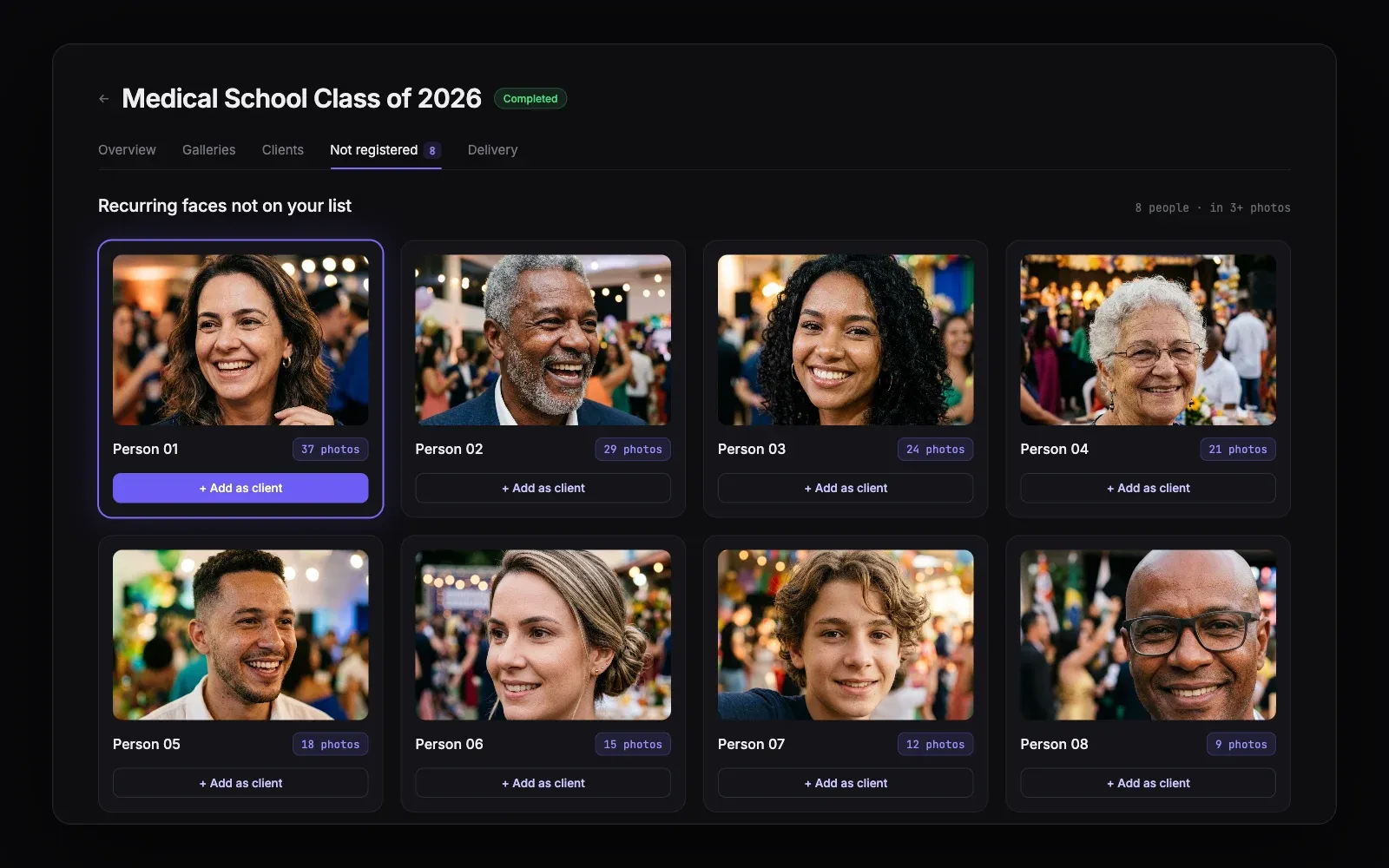
Every face in the crowd is a potential client
The system flags who shows up a lot but isn't on your list. Every face it finds is a sale that usually slips by. Included in Standard and Pro; on Basic, unlock it per project (20% of the processing cost).
Each person gets only their own photos
Recognition sorts almost everything on its own; you only review the lowest-similarity photos, already sorted to the top.
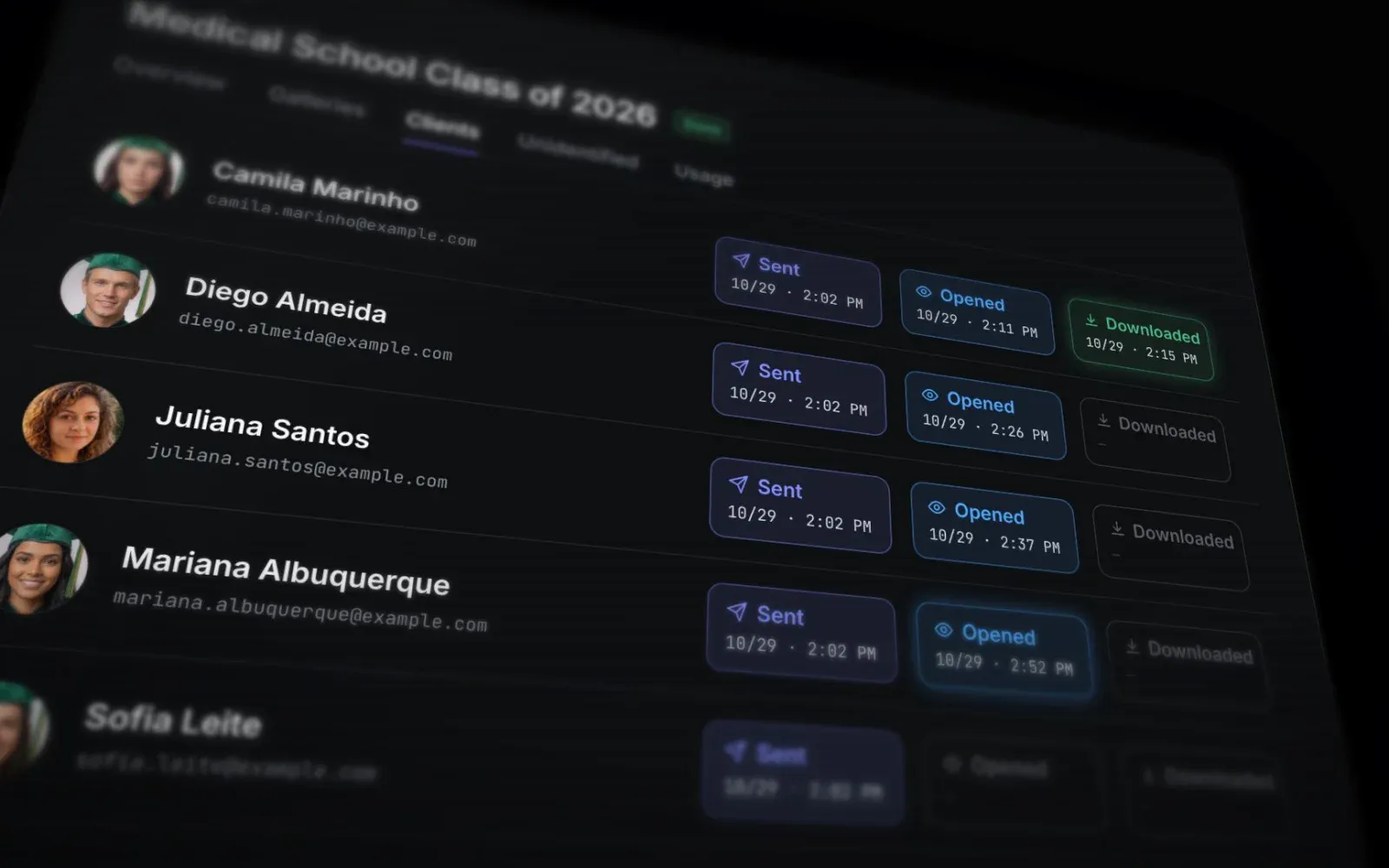
One link per person, with your name and your message
Send it by email straight from the platform, or copy the link and share it anywhere.
The photos expire, the project stays
On the project's expiration date (14 or 30 days depending on the plan, and extendable) the photos and biometric data are deleted. The project, the registered people and the report stay in your account.
Delivery stops waiting on you
The manual step that cost you days is gone.
The bigger the event, the more it pays off
Your gain grows with the volume instead of drowning in it.
Desktop app to organize your photos right on your computer, no reprocessing needed
Create accountHow it works
From event to delivery, in three steps
-
Upload the photos
The reference photo of each student and the event shots — just drag whole folders in. The reference is the one you already shoot in the studio; the event photos go in exactly as they sit on your computer.
-
GroupFaces sorts them by student
It matches the event photos against the references and builds each student's gallery on its own, whatever the volume. You get a notification when it's done.
-
Deliver and track
Each student gets a link to their own gallery. Send it by email or copy the link, and track who's already opened it from your dashboard.
Delivery
Know exactly where every album stands
Every link has a status — sent, opened, downloaded — with date and time. When someone stalls claiming it “never arrived,” you know they opened it at 10:47 PM on Tuesday.
| Student | Status | When |
|---|---|---|
| João Vitor | SentOpenedDownloaded | Tue, 10:47 PM |
| Beatriz | SentOpenedDownloaded | Tue, 8:12 PM |
| Lucas | SentOpenedDownloaded | Wed, 9:05 AM |
| Mariana | SentOpenedDownloaded | Wed, 2:31 PM |
| Rafael | SentOpenedDownloaded | no record |
| Camila | SentOpenedDownloaded | Thu, 12:15 PM |
40
18
Built for graduation photographers Studio, solo, or events company — different routines, the same late night digging through photos. GroupFaces handles all three
Graduation studio
Signs the whole class and has to deliver big volume on deadline, without putting the team on photo-by-photo digging.

Solo photographer
Does it all alone, from the studio to the handoff on WhatsApp. Can't afford to burn the night sorting faces by hand.

Events company
Covers graduations, corporate, and parties. In every crowd there are far more faces than clients on the contract.
Start free Scale up when the volume calls for it
A free-forever plan to run your first event. Standard and Pro add more resolution and photo delivery; Pro includes 1 edit per project. No annual lock-in.
To test the flow on your first event.
Free Forever
- Full HD resolution (1080p)
- 100 tokens per image
- 14-day project expiration
- Client delivery (link, ZIP, email)
- People clustering (paid add-on)
- Included project edits
For photographers booking graduations regularly.
Paid plan Quarterly or half-year. Prices shown in your currency at sign-up.
- 4K Ultra HD resolution
- 80 tokens per image
- Client delivery (link, ZIP, email)
- People clustering
- 14-day project expiration
- Included project edits
Studios delivering volume at top quality.
Paid plan Quarterly or half-year. Prices shown in your currency at sign-up.
- 8K Ultra HD resolution
- 60 tokens per image
- Client delivery (link, ZIP, email)
- People clustering
- 1 included project edit
- 30-day project expiration
Each plan sets how many tokens a photo costs. Before you process, we show whether your balance covers the whole event — no surprises on the bill. High volume: monthly Enterprise plans with included tokens and a lower cost per image (Brazil only). Talk to us.
Payment: subscriptions by credit card; token packs by Pix or card in Brazil, by card elsewhere.
Talk to usFAQ
Questions that always come up
Quick answers to the most common questions about our platform.
Is it really free?
Creating an account and uploading photos is free, no card needed. You only pay when you process, and each processed photo uses tokens based on your plan: 100 on Basic, 80 on Standard, 60 on Pro. Delivering galleries to your clients by link is on the Standard and Pro plans.
Is this legal? What about data protection?
Facial recognition is sensitive biometric data: used only inside the project, never to train models, and deleted when the project expires or is deleted. Traffic is encrypted and each album opens through a link with a secret. The photographer is responsible for the consent of the people photographed at the event, and the platform gives you the tools to comply with LGPD (Brazil) and GDPR (European Union). Personal data questions: privacidade@groupfaces.io.
What if GroupFaces can't find someone?
It happens. Anything GroupFaces can't match lands in an unidentified-photos tab, and you fix it by hand in seconds.
Do I need to be tech-savvy to use it?
No. If you can drag a folder of photos, you can use it. The flow is a five-step walkthrough.
How long does it take to process a graduation?
It depends on the photo volume. You watch the progress live, with speed and estimated time on screen.
Does removing a photo from a client's album delete it for good?
No. Hiding a photo from a student's album doesn't remove it from your main gallery. You control what each person sees.
Does it work after the project expires?
Yes. The desktop app for Mac and Windows uses the project report to sort your full-resolution originals right on your computer, into one folder per person. It works offline, even after the deadline passes.
Automate the delivery of your events.
Free account, no card. Client delivery starts on Standard.